Graphic2DControl をフォームに配置するまで(約5分)
Step 1:NuGet からインストール
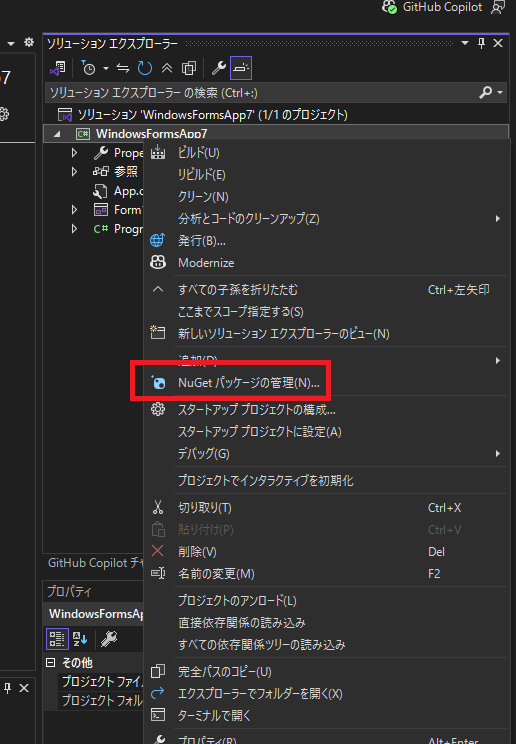
まず、Graphic2DControl を使用するプロジェクトを右クリックし、
「NuGet パッケージの管理(N)…」 をクリックします。
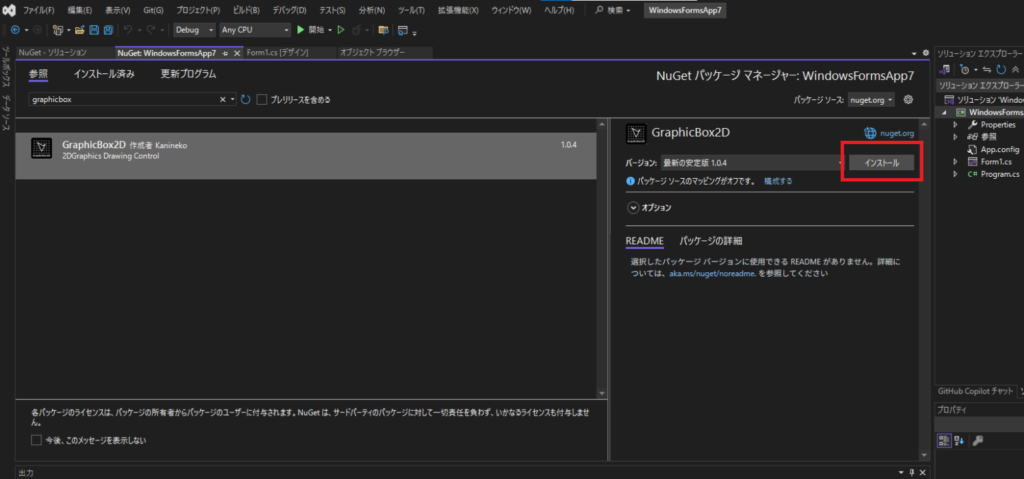
検索欄に graphicbox と入力すると GraphicBox2D が表示されるので、
選択して 「インストール」 を押します。
Step 2:ツールボックスにコントロールを追加
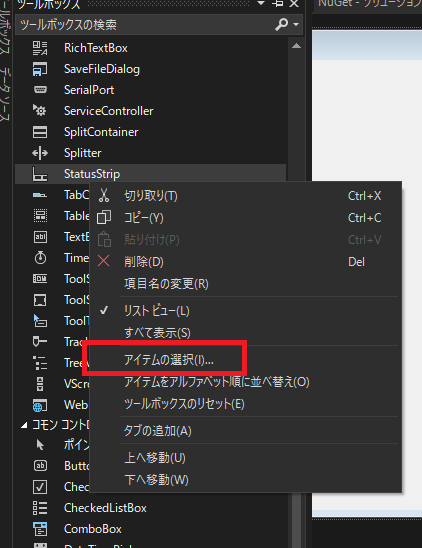
NuGet インストール後、
ツールボックス上で右クリック →「アイテムの選択」 を押します。
Step 3:DLL を選択
ソリューションファイルと同じ階層にある
packages フォルダ内の、以下の DLL を選択します。
GraphicBox2D.X.X.X
 └ lib
   └ net472
     └ graphicbox2d.dll
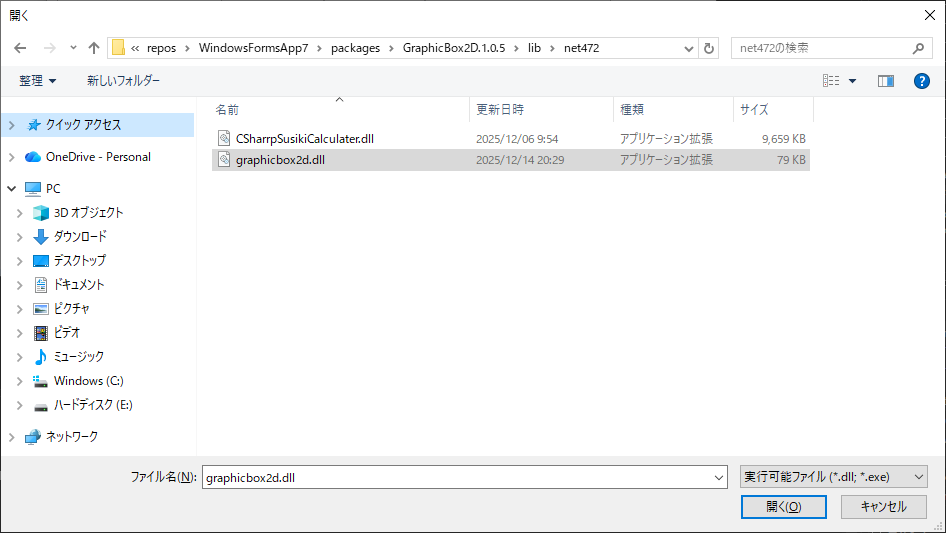
選択後、「OK」 を押してダイアログを閉じます。
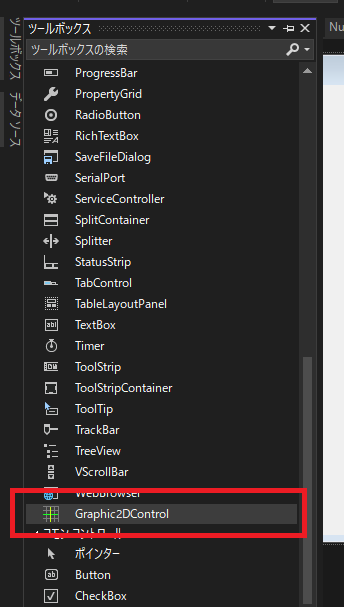
Step 4:ツールボックスに表示される
ツールボックスに Graphic2DControl が表示され、
使用可能な状態になります。
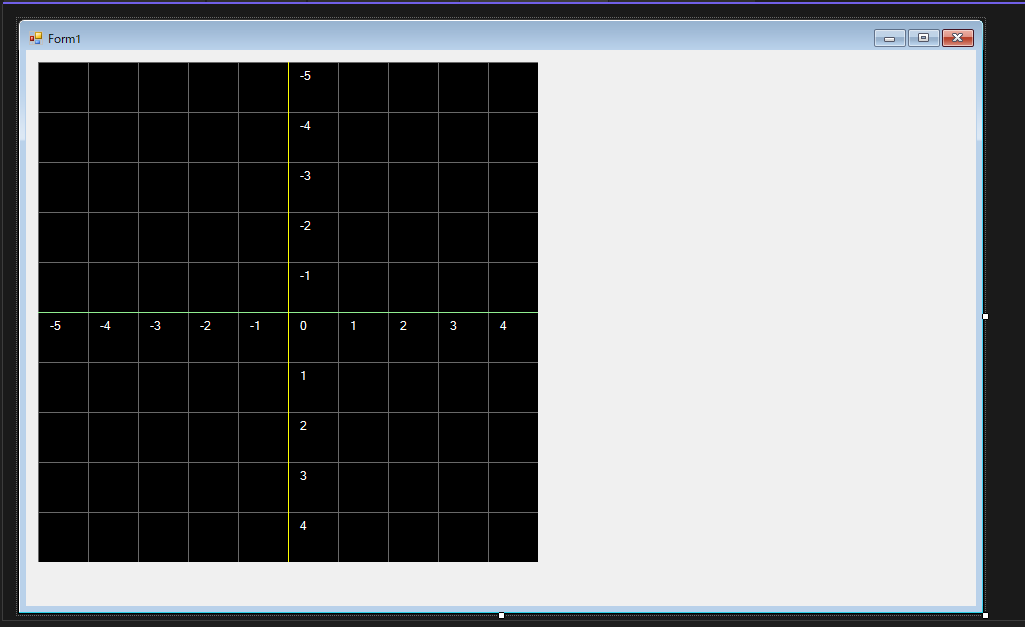
Step 5:フォームに配置
ツールボックスから ドラッグ&ドロップ で
フォームに配置してください。
💡 ヒント
デフォルトのコントロールサイズは 500 × 500 です。
必要に応じて自由にサイズ変更できます。
デフォルトのコントロールサイズは 500 × 500 です。
必要に応じて自由にサイズ変更できます。
Step 5:サンプルソースを実行
ボタン押下イベントなどに、以下のソースを張り付けて実行してみましょう。
/ Point
Point2D point = new Point2D();
point.X = -1;
point.Y = -1;
this.graphic2DControl1.Points.Add(point);

// Circle
Circle2D circle = new Circle2D();
circle.X = 3;
circle.Y = 3;
circle.R = 1.0f;
circle.IsFilled = false;
circle.LineColor = Color.Red;
this.graphic2DControl1.Circles.Add(circle);

// Polygon
Polygon2D polygon2D = new Polygon2D();
polygon2D.IsDrawOutLine = true;
polygon2D.LineColor = Color.Yellow;
polygon2D.LineStyle = DashStyle.Solid;
polygon2D.IsFilled = true;
polygon2D.FillColor = Color.Green;
polygon2D.Points.Add(new PointF(-2, 2));
polygon2D.Points.Add(new PointF(-1, 4));
polygon2D.Points.Add(new PointF(0, 2));
this.graphic2DControl1.Polygons.Add(polygon2D);

// Arrow
Arrow2D arrow = new Arrow2D();
arrow.Start = new Point(0, 0);
arrow.End = new Point(3, 3);
arrow.Color = Color.Green;
arrow.Style = DashStyle.Solid;
this.graphic2DControl1.Arrows.Add(arrow);

// Text : Welcome
Text2D text = new Text2D();
text.X = -3;
text.Y = -3;
text.FontSize = 16.0f;
text.Text = "ようこそ、3D数学";
text.Angle = 30.0f;
this.graphic2DControl1.Texts.Add(text);

// Text : Angle
Text2D text2 = new Text2D();
text2.X = 0.4f;
text2.Y = 0.4f;
text2.FontSize = 11.0f;
text2.Text = "45°";
text2.Color = Color.Cyan;
this.graphic2DControl1.Texts.Add(text2);

// Text : cosθ
Text2D text3 = new Text2D();
text3.X = 1.5f;
text3.Y = 1.0f;
text3.FontSize = 16.0f;
text3.Text = "cosθ";
this.graphic2DControl1.Texts.Add(text3);

// Arc
Arc2D arc = new Arc2D();
arc.X = 0;
arc.Y = 0;
arc.R = 1.0f;
arc.StartAngle = 0f;
arc.EndAngle = 45.0f;
arc.IsFilled = false;
arc.LineColor = Color.Cyan;
this.graphic2DControl1.Arcs.Add(arc);

// Graph
Graph2D graph = new Graph2D();
graph.Susiki = "cos(x)";
graph.StartX = -5.0f;
graph.EndX = 5.0f;
graph.Color = Color.White;
graph.CalculateInterval = 0.05f;
graph.CalculateGraphPoints();
this.graphic2DControl1.Graphs.Add(graph);

// Redraw
this.graphic2DControl1.Invalidate();
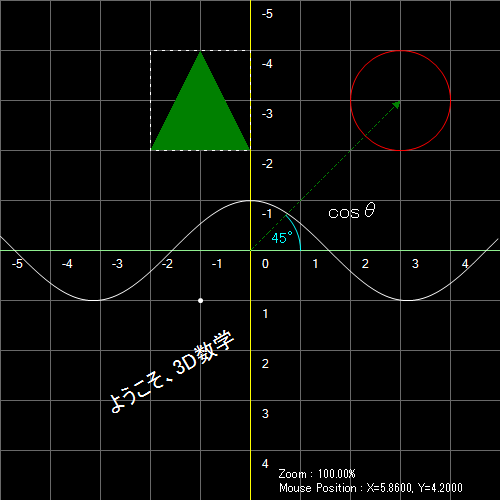
様々な図形が描画されます。
🎉 完了!
- 📘 プロパティリファレンス
- ⚙ メソッドリファレンス
- 🖱 イベントリファレンス